How to Design Jewellery Category Pages That Help Shoppers Find the Right Piece
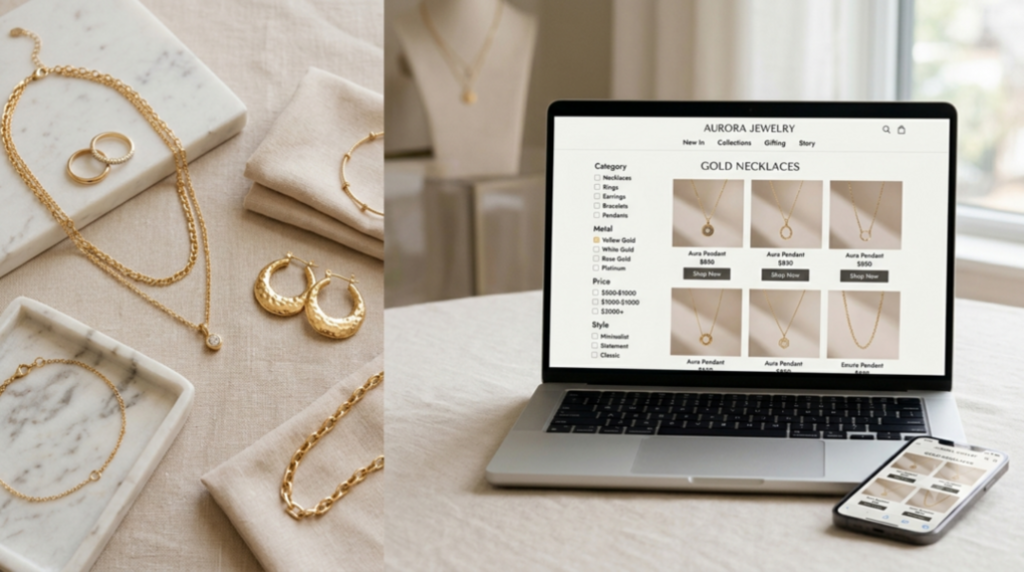
A shopper looking for a gold necklace may face hundreds of options on an online store. If the products are hard to compare or the filters are confusing, the shopper may leave without buying anything.
This is why category pages matter in online jewellery stores. A good category page helps shoppers find the right product, compare designs, and make buying decisions with ease.
For brands investing in jewellery ecommerce website development, category page design should be a key priority. It is not just about showing products. It is about making the shopping journey simple and smooth.
Jewellery shoppers often browse by product type, metal, stone, style, price, size, and occasion. Your website should support these needs with clear categories, useful filters, quality images, and helpful product details.
In this guide, we will explore practical ways to design jewellery category pages that improve product discovery, build trust, and support sales.
1. Build Category Paths Around How Shoppers Browse
Group Products in Ways Customers Understand
Start with clear and simple product categories. Common categories include:
Rings
Earrings
Necklaces
Bracelets
Jewellery gifts
You can also create smaller categories for shoppers with specific needs. For example, engagement rings, birthstone jewellery, gold hoops, and pearl necklaces.
Use words that customers know. Avoid internal product names or technical terms that may confuse first-time visitors.
A clear category structure helps shoppers reach the right products without clicking through too many pages.
Make the Menu Easy to Use on Mobile
Many shoppers browse jewellery stores on their phones. Your mobile menu should be simple to scan and use.
Keep popular categories near the top. Use short labels and make menu items easy to tap.
Add breadcrumbs to show shoppers where they are on the website. For example:
Jewellery > Earrings > Hoops
Breadcrumbs help users move back to a broader category without starting again.
Give Seasonal and Gift Needs a Clear Place
Some shoppers know what they want to buy, while others need ideas.
Create useful shopping paths for occasions such as weddings, anniversaries, birthdays, and festivals.
You can also create gift sections based on:
Recipient, such as gifts for her or gifts for him
Budget, such as gifts under ₹2,000
Occasion, such as birthday or anniversary gifts
Delivery needs, such as ready-to-ship gifts
Look at brands like Mejuri and Tiffany & Co. for ideas on how core categories and gift collections are presented. Review their current navigation and note which choices make product discovery easier.
2. Make Filters Match Real Jewellery Choices
Filters help shoppers reduce a large product list to a smaller, more useful selection.
Put the Most Useful Filters First
Choose filters based on what customers want to know before buying.
Useful jewellery filters include:
Price
Metal type
Stone type
Product size
Style
Product type
However, filters should change based on the category.
For example, ring pages should offer ring sizes. Necklace pages may need chain length filters. Earring pages may benefit from closure type or style filters.
If possible, show the number of products that match each option. This helps shoppers understand what to expect before selecting a filter.
Let Shoppers Combine Filters with Ease
Shoppers may want a gold necklace under ₹5,000 or a silver ring with a specific stone.
Allow users to combine multiple filters without difficulty.
Keep selected filters visible so shoppers can see their choices. Add small remove options next to each selected filter and include a clear Clear all option.
Make sure the product list updates correctly when shoppers change their selections. On mobile, filters should be easy to open, apply, and close.
Explain Jewellery Terms in Simple English
Some jewellery terms may be new to shoppers.
For example:
Vermeil: A thick layer of gold over sterling silver.
Lab-grown diamond: A diamond made in a controlled setting instead of forming naturally underground.
Carat: A unit used to measure a gemstone's weight, not its size.
Gold-plated: A thin layer of gold placed over another material.
Use short help notes or link to buying guides. Clear explanations can help shoppers choose products with more confidence.
Baymard Institute's ecommerce usability research is a useful resource for reviewing product list and filtering practices. Before publishing any expert quote, verify the exact wording, researcher name, and original source.
3. Help Shoppers Compare Products at a Glance
Show Key Details on Product Cards
A product card should answer basic questions without making shoppers open every product page.
Include useful details such as:
Product name
Price
Metal type
Stone type
Available sizes
Main design feature
Show sale prices clearly. If a product has different prices based on size or material, explain the price range.
Also, label products that are made to order, have limited size options, or need extra delivery time.
The goal is to help shoppers compare similar products quickly.
Use Images That Answer Buying Questions
Jewellery can look very different in real life than it does in a small product photo.
Use a mix of images to show important details.
For example, show the product on a person to explain its scale. Add a plain background image to highlight the design. Include close-ups of stone settings, clasps, texture, and finishing.
Keep image quality, lighting, and cropping consistent across the category page.
This creates a cleaner shopping experience and makes product comparison easier.
Add Quick Actions Without Making the Page Busy
Useful quick actions include saving a product, viewing key details, or selecting a metal option.
Keep these features simple. Too many buttons can make product cards difficult to use.
Make sure buttons work on mobile and with a keyboard. Use clear labels that screen readers can understand.
Also, make selected metal and colour options easy to identify.
4. Build Trust Before Shoppers Open a Product Page
Jewellery can be a high-value purchase. Shoppers often need more information before they feel ready to buy.
Show Proof That Supports the Purchase
Add verified customer reviews and ratings where available. Customer photos can also help shoppers understand how a piece looks in real life.
Make important shopping policies easy to find, including:
Return and exchange terms
Shipping costs and delivery times
Warranty details
Resizing options
Jewellery care instructions
If you sell certified diamonds or make sourcing claims, explain the relevant certification or sourcing details clearly.
Avoid claims that you cannot prove.
Address Fit, Scale, and Value Concerns
Fit is an important part of jewellery shopping.
Add clear ring size guides and explain how customers can measure their size. For necklaces, show chain lengths and explain where each length may sit.
Use model images and simple scale references to show product size.
Price transparency also matters. Explain what affects the price, such as metal purity, gemstone type, stone weight, design, and custom work.
These details help shoppers understand the value of a piece before making a decision.
Learn from Real Jewellery Ecommerce Examples
Blue Nile is a useful example to review when studying diamond and engagement ring shopping journeys.
Look at its current category paths, filters, comparison details, and buying guides. Consider how these features help shoppers compare expensive products.
You can also test trust improvements on your own website.
For example, compare a category page without a visible review count against a version with a verified review count. Measure product clicks, add-to-cart rates, and purchases.
For expert insights, speak with a jewellery retail or UX professional about how sizing guides and clear return terms affect shopper confidence. Use only verified quotes with permission where needed.
5. Measure Discovery and Improve the Page Over Time
A category page should improve based on real customer behaviour, not guesses.
Track Actions That Show Whether Shoppers Find Products
Measure important actions such as:
Filter usage rate
Sort changes
Product card clicks
Saved products
Add-to-cart rate
Category page exit rate
Purchase conversion rate
Break down the results by device, traffic source, and product category.
For example, shoppers may use metal filters often but still leave the page. This may point to missing product details, poor results, or limited stock.
Test Changes with Clear Goals
Avoid changing everything at once.
Test one improvement at a time, such as:
Moving price filters to the top
Adding metal details to product cards
Improving product images
Making mobile filters easier to use
Choose a clear goal before each test. This could be more product clicks, fewer failed searches, better add-to-cart rates, or higher conversion.
Do not judge success by page views alone.
Use Current Data to Guide Your Next Change
Use your analytics, site search reports, and customer support records to find problems.
For your report, include these figures:
Data note: Insert your retailer's verified figures, date range, and source before publishing. For example, report data for the last 30 days and include the number of category sessions analysed. These figures are not universal benchmarks.
Use a consistent measurement method when comparing results over time. Also, check whether tracking is working correctly before making decisions.
Turn Category Pages into a Clearer Path to Purchase
A strong jewellery category page helps shoppers narrow their choices, compare products, and trust what they see.
Start by reviewing your website menu, filters, product cards, images, and mobile layout. Look for places where customers may feel confused or need extra clicks.
If you are planning jewellery ecommerce website development or improving an existing store, begin with one high-traffic category.
Find its biggest product discovery problem and test one focused change. Measure the result and use what you learn to improve other categories.
Small, customer-focused improvements can make jewellery shopping easier and create a better path from browsing to buying.
Frequently Asked Questions (FAQs)
1. What is a jewellery category page?
A jewellery category page is a webpage that groups similar jewellery products, such as rings, earrings, necklaces, and bracelets. It helps shoppers find the products they want quickly.
2. Why are category pages important for a jewellery ecommerce website?
Category pages make online shopping easier by helping customers browse, filter, and compare products. A well-designed page can improve user experience, support product discovery, and help increase sales.
3. What filters should a jewellery category page include?
Useful filters include price, metal type, stone type, size, style, and product type. The filters should match the category. For example, ring size is useful for rings, while chain length is useful for necklaces.
4. How can I improve the mobile experience of jewellery category pages?
Use a simple menu, clear product images, easy-to-tap buttons, and mobile-friendly filters. Keep important product details visible and avoid making shoppers scroll through too many options.
5. What information should jewellery product cards display?
Product cards should show the product name, price, metal type, stone details, available sizes, and key design features. Clear images and visible sale prices can also help shoppers compare products.
6. How can jewellery category pages build customer trust?
Show verified reviews, customer photos, clear return policies, shipping details, warranty information, and size guides. Provide certification details for relevant products and avoid unsupported product claims.
7. How does jewellery ecommerce website development improve product discovery?
Good jewellery ecommerce website development helps create clear category structures, useful filters, fast-loading pages, and easy navigation. These features help shoppers find and compare jewellery with less effort.
8. How can I measure the performance of jewellery category pages?
Track filter usage, product clicks, sort changes, add-to-cart rates, conversion rates, and category page exit rates. Review these metrics by device and traffic source to identify areas for improvement.
9. How often should I update jewellery category pages?
Review category page performance regularly, such as once a month. Update categories, filters, product information, and seasonal collections based on customer needs, product availability, and analytics data.
10. How can I make jewellery category pages more SEO-friendly?
Use clear category names, descriptive page titles, unique meta descriptions, helpful category content, clean URLs, and internal links. Make sure product listings are accessible to search engines and avoid adding unnecessary text that makes shopping harder.
Latest Posts
-
How to Design Jewellery Category Pages That Help Shoppers Find the Right Piece
-
How to Build an Online Jewellery Store from Scratch with Jewellery Website Development Services
-
How to Choose Between a Website and a Mobile App
-
What Makes Jewellery Website Development Different From Other eCommerce Websites?
-
Jewelry Website Development in 2026: The Hidden Truth Most Agencies Won’t Tell You